


Google Ads is now providing advertisers with greater control over how their campaign budgets are distributed among various channels. The new features for prioritising channels and allocating budgets allow businesses to determine which channels should receive the greater amount of spending and which should get a smaller share.
For businesses that have to manage their advertising costs, these changes provide an additional method of balancing budget, lead quality and campaign performance; However, the results depend on how the settings are used.
What Are Google Ads’ New Budget Controls?
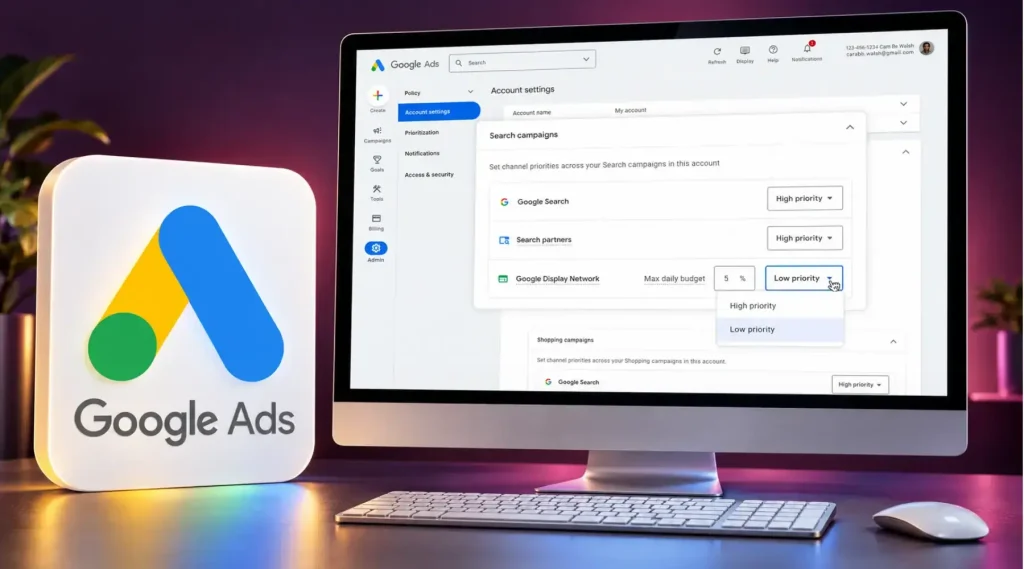
With channel prioritisation, advertisers can indicate which channels are to be considered high or low priority. Google allocates its spending first to the high-priority channels and then uses the rest of the budget on the lower-priority ones, while considering the campaign’s bidding strategy and settings.
Budget allocation lets advertisers set a desired daily budget percentage for a low-priority channel. This is a best-effort allocation, not a guaranteed spending cap, so actual spending may occasionally exceed the selected percentage.
For example, a business may want Google Search to receive priority because it attracts people actively looking for its services. It can still use the Display Network for additional reach while assigning it a lower priority.
Which Campaigns Support These Controls?
The available options depend on the campaign type.
- Search campaigns: Advertisers can prioritise Google Search, Search partners and the Google Display Network.
- Shopping campaigns: Priority settings are available for Google Search and Search partners.
- Performance Max: Search partners and the Display Network can have separate priorities from Google’s other channels.
- Demand Gen: Advertisers can prioritise Google channels and the Display Network separately.
Google channels can include placements such as YouTube, Search, Maps, Gmail and Discover. These controls do not allow advertisers to set a separate priority for every individual Google-owned placement.
Eligible channels are set to high priority by default. Advertisers can adjust these settings when they want to change how spending is distributed.
Why Do These Changes Matter?
Previously, an advertiser who wanted to cut back on spending in a channel might have simply switched that channel off. That would have reduced the spend but also removed the opportunity to test whether that channel actually delivered anything useful.
The new controls give you another option: you can prioritise the most important channels and still test the others.
For example, take a website development agency based in Dubai. Their Search ads are generating leads from people who are actively seeking a provider. They may want to focus on Search and use Display ads to reach other potential customers.
By putting Display at a lower priority, the agency can test it without giving it the same spend priority as Search.
The key thing to do is to look at the qualified enquiries, cost per lead and sales opportunities. Clicks in themselves are not sufficient to determine whether a channel is worth spending more money on.
How to Manage Campaigns With the New Controls
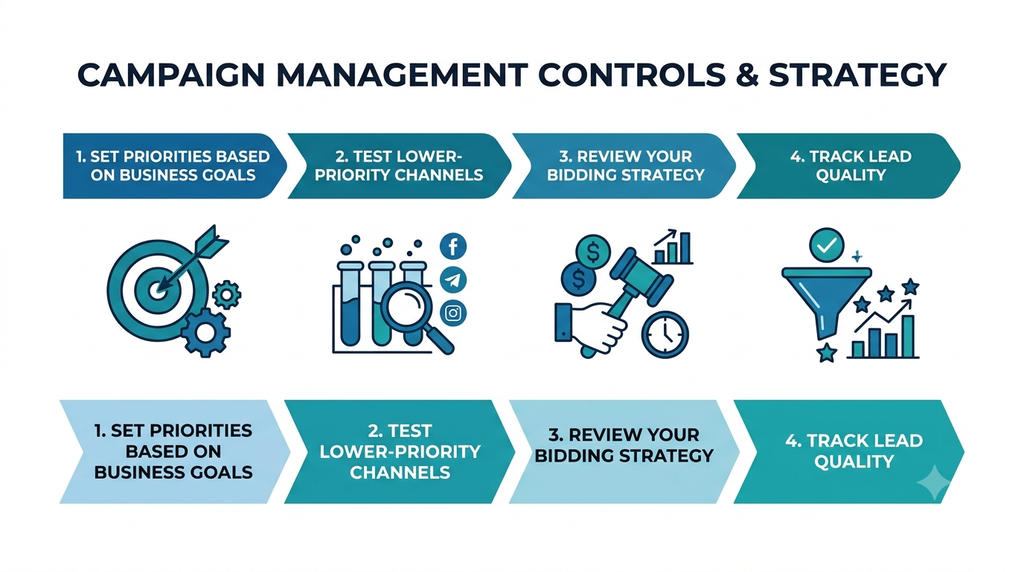
1. Set Priorities Based on Business Goals
Start by identifying what the campaign needs to achieve. An e-commerce store may focus on purchases, while a service business may prioritise qualified enquiries.
Review conversion data, cost per lead and sales quality before deciding which channels should receive priority. A professional Google Ads agency in Dubai can help you read this data and set priorities with confidence.
2. Test Lower-Priority Channels
A channel with inconsistent results may still bring valuable customers. Instead of excluding it immediately, consider testing it with a modest allocation.
For example, a business might use a 10% allocation as an initial testing approach. This is only an illustration; the right percentage depends on the campaign and its goals.
Monitor the results over a suitable period. If the channel brings relevant leads at an acceptable cost, review whether its priority should change.
3. Review Your Bidding Strategy
Channel prioritisation does not affect every campaign in the same way. For campaigns using Target CPA or Target ROAS that are not limited by budget, priority settings generally do not change spending distribution across channels. However, a budget allocation set for a low-priority channel still applies.
Advertisers should therefore review their bidding strategy and budget status before expecting performance changes.
4. Track Lead Quality
Low-cost clicks do not always produce good leads. A channel may attract many visitors but generate few genuine enquiries.
Track the journey from ad click to enquiry, qualified lead and sale wherever possible. This helps businesses understand which channels contribute to meaningful results. Paid ads work best alongside a digital marketing strategy that connects ads, content and follow-up.
How Soharon Infotech Can Help
Managing Google Ads successfully involves more than just selecting keywords and determining how much to spend daily. Businesses need to analyse conversions, learn about leads, and change their campaigns based on real-life results.
Soharon Infotech helps companies connect measurable advertising results with proper decisions in their campaign management. One of the keys to improving budget management is to evaluate channel necessity.
Final Thoughts
To manage spending better, Google Ads has introduced new budget controls that have proven very helpful for advertisers. Businesses are now able to allocate money in a flexible way to the channels they need the most, while still testing other channels to improve their experience.
When applying budget controls, advertisers can continually adjust their decisions based on the data, considering their specific goals and the quality of leads they get.






 SHARE YOUR REQUIREMENTS WITH US!


