


If you’re running Google Ads and your budget seems to disappear faster than it should, you’re not alone. Most businesses assume a low return on ad spend means their ads just aren’t good enough. But often, the real problem isn’t the ad copy or the keywords. It’s a setting buried somewhere in the campaign that’s quietly draining money without you even noticing.
At Soharon Infotech, we’ve reviewed dozens of Google Ads accounts over the years, and honestly, the same mistakes show up again and again. Business owners set up a campaign, hit launch, and never go back to check the fine print. That’s understandable. Google Ads has a lot of moving parts, and some of the settings that matter most aren’t exactly front and center. Let’s go through the ones that tend to cause the most damage.
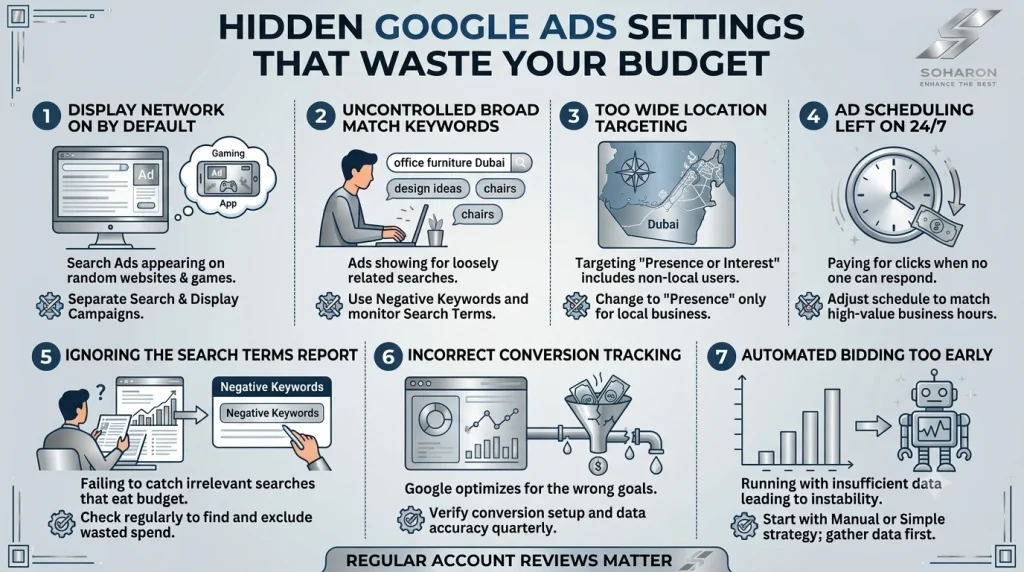
Display Network Is Turned On By Default
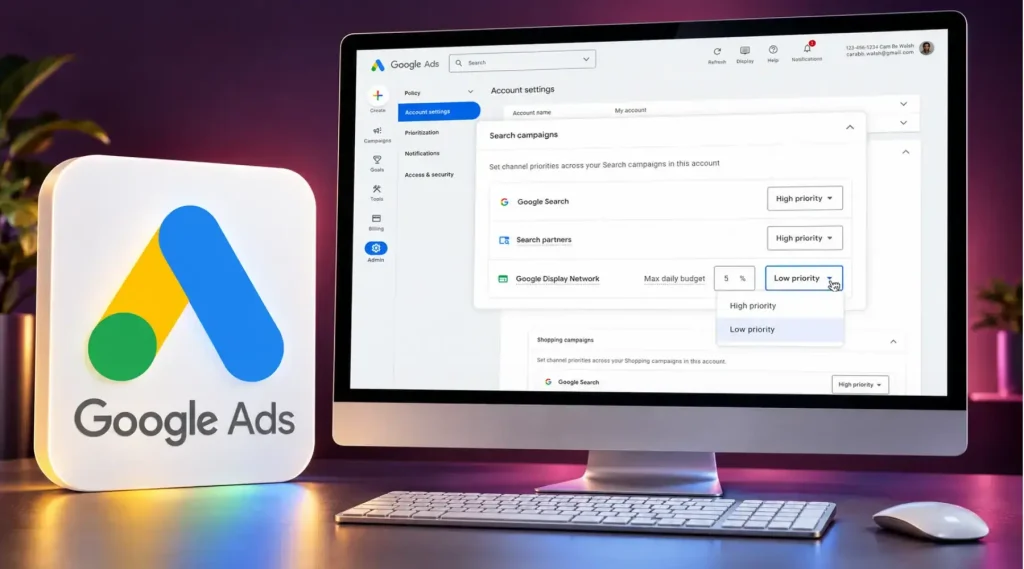
This is probably the biggest one. When you create a Search campaign, Google automatically includes the Display Network unless you manually turn it off. That means your ads could be showing up on random websites design, mobile apps, and games, not just in search results.
The problem is that Display Network traffic usually converts much worse than Search traffic. You might get a lot of clicks, but very few of them turn into actual customers. If you’ve ever looked at your campaign and wondered why your click numbers are high but your leads are low, this setting is often the reason.
The fix is simple. Go into your campaign settings and separate Search and Display into their own campaigns. Never run them together unless you have a specific reason to.
Broad Match Keywords Without Proper Control
Keyword match types decide how closely a search has to match your keyword before your ad shows up. Broad match is the loosest option, and it can show your ad for searches that barely relate to what you’re actually selling.
For example, if you’re bidding on “office furniture Dubai” with broad match, your ad might show up for searches like “furniture” or even “office design ideas.” Some of that traffic might be useful. A lot of it won’t be.
Broad match isn’t always bad, but it needs to be paired with strong negative keywords and careful monitoring. Without that, it becomes one of the easiest ways to burn through a budget without realizing it.
Location Targeting Set Too Wide
This one catches a lot of local businesses off guard. If you’re targeting a city like Dubai, Google’s default setting often includes people who are simply interested in Dubai, even if they’re not physically there. That means someone browsing travel content from another country could see your ad and click it, costing you money for a click that was never going to turn into a customer.
If your business depends on local customers, go into location settings and choose “Presence” instead of “Presence or Interest.” It’s a small change, but it can make a noticeable difference in the quality of your traffic.
Ad Scheduling Left On All Day, Every Day
Not every hour of the day brings the same value. If your business only takes calls during working hours, but your ads run 24 hours a day, you’re likely paying for clicks that happen when nobody is available to respond.
Look at your conversion data by hour and day of the week. You’ll often find clear patterns, certain times perform well, others barely convert at all. Adjusting your ad schedule to match those patterns is one of the easiest ways to stop wasting money on clicks that were never going to convert anyway.
Ignoring the Search Terms Report
This report shows the exact words people typed before your ad appeared. A lot of advertisers set up their keywords once and never look at this report again. But it’s one of the most useful tools available, because it tells you exactly where your money is going.
Checking this regularly helps you catch irrelevant searches early and add them as negative keywords before they eat into your budget. Skipping this step is a bit like leaving a tap running in another room. You won’t notice the waste until the bill arrives.
Conversion Tracking That Isn’t Set Up Correctly
This might be the most overlooked issue of all. If your conversion tracking isn’t accurate, Google’s bidding system doesn’t actually know what’s working. It ends up optimizing for the wrong things, because it’s working with bad information.
We’ve seen accounts where a form submission was being counted twice, or where a conversion was tracking a page view instead of an actual lead. These small errors can quietly send your entire campaign in the wrong direction. It’s worth checking your tracking setup every few months to make sure everything is still firing correctly.
Automated Bidding Turned On Too Early
Automated bidding strategies like Target CPA or Maximize Conversions can work really well, but only once there’s enough data for Google’s system to learn from. Turning these on too early, before your campaign has enough conversion history, often leads to unpredictable results and wasted spend.
If your campaign is new, it’s usually better to start with manual bidding or a simpler automated strategy, then move to more advanced options once you have solid data to support it.
Why These Settings Get Missed
None of these issues happen because someone was careless. Google Ads is genuinely complex, and it’s built in a way where a lot of these settings are turned on by default. Most people assume the default settings are the safe choice. In reality, the defaults are often designed to spend your budget quickly, not necessarily to spend it wisely.
This is exactly why regular account reviews matter so much. A setting that made sense six months ago might not make sense today, especially as your business changes or your market shifts.
Final Thoughts
Google Ads can be one of the most effective tools for growing a business, but only when it’s set up correctly and reviewed regularly. Small settings that seem harmless can quietly work against you, pulling budget away from the customers you actually want to reach.
At Soharon Infotech, we help businesses go through their Google Ads accounts, find these hidden issues, and fix them before they cost any more money. If you haven’t checked your account settings in a while, now might be a good time to take a closer look.
Read more: A Guide to Google Ads Extensions to Boost your Ads





 SHARE YOUR REQUIREMENTS WITH US!


